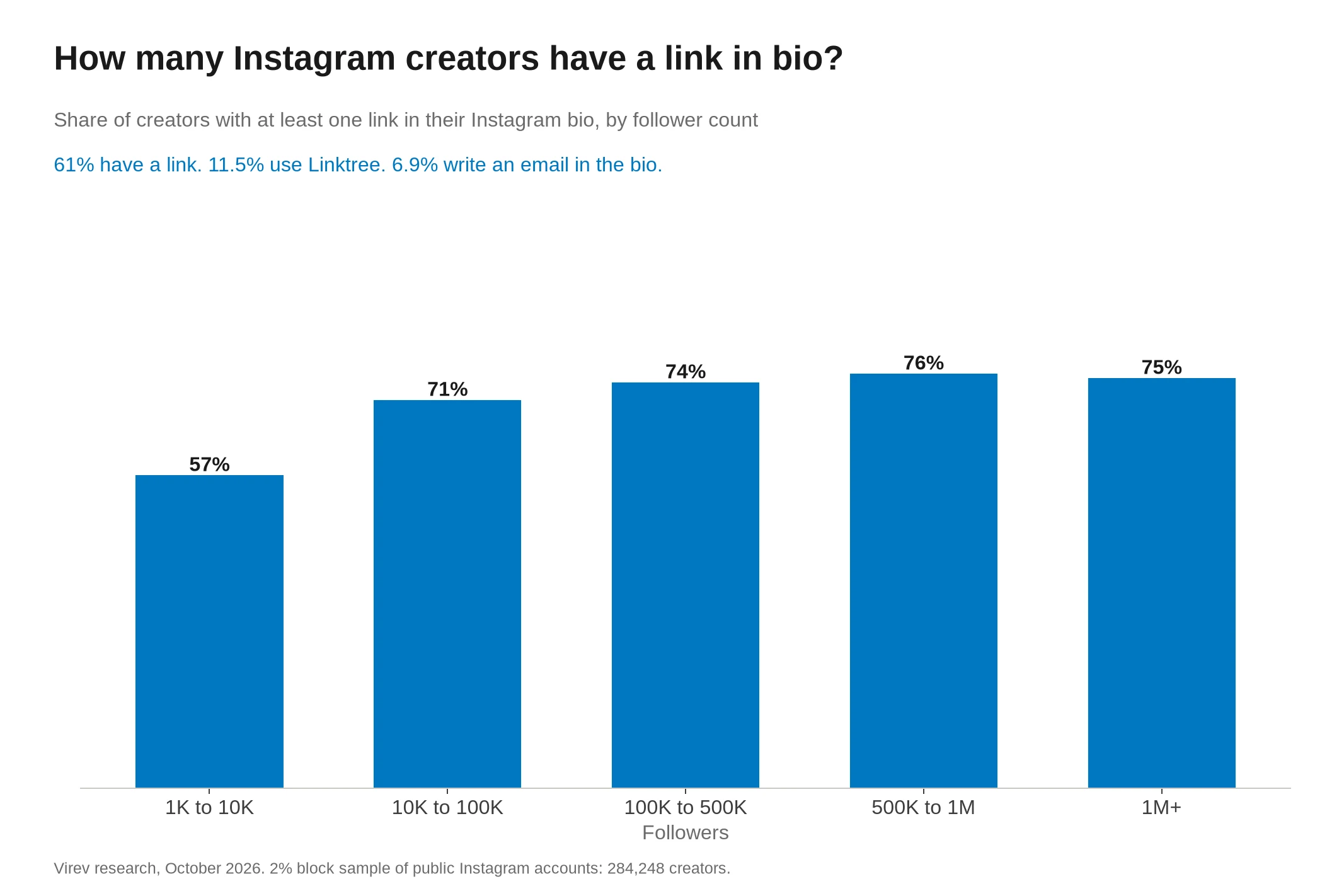
To find an Instagram or TikTok creator's business email, check the contact options on the profile first. Then read the bio and open the website the creator links. In Virev's 2026 count, 6.9% of Instagram creators with 1,000+ followers write an email in the bio and 60.9% have a bio link (link in bio statistics). Use only an address, form or representative that the creator publishes for business inquiries. If an email finder or your own lookup finds nothing, record that result and stop. Do not guess an address from a name or username, and do not work around a messaging restriction.
An email address is one possible result. A partnership form or a management contact can answer the same need, and a clear "no route found" note is also a valid result.
What Instagram shows on a profile
Instagram's professional-account help says Business and Creator accounts can add a Contact button near the top of their profile. That button can hold an email address, a phone number or directions. When the owner turns it on, visitors who tap Contact can see the information.
A professional account does not guarantee an email result. Instagram's account setup instructions let owners skip contact details and choose whether to show them. In the app, those choices sit under Edit profile, then Profile display, within Public business information. Only the owner can change them, and you do not need to change your own account type to follow this checklist.
Modash's Instagram email guide recommends the mobile app for contact lookup. Its desktop comparison is dated December 2025. If the button is missing on desktop, check the app before you draw a conclusion. This guide draws on the official help pages and does not claim a live test of every app version.
What TikTok shows on a profile
TikTok has no Contact button like Instagram's, so the bio and the profile link carry most of the business routes. TikTok's profile-link help says a website link needs at least 1,000 followers or a Verified Business Account. A missing link tells you little about whether a creator wants business inquiries.
The same help page says TikTok no longer supports links that open or log people into other social media apps. Creators can still link to those platforms' websites. Older guides that tell you to look for a particular social-app button may not match the profile you see.
TikTok opens profile links in its in-app browser. It may ask you to continue in your device's browser when you follow a chain of external links. If you continue, check the destination before you enter any information. A broken link, a login wall or an access restriction goes in your lookup log, and none of them proves the creator lacks a contact page.
Modash's guide to finding TikTok emails also recommends checking the bio, the linked website and linked social profiles. For this workflow, keep the search within routes the creator published.
Use this lookup checklist
Follow the steps in order on either platform. Stop when you find a current route that fits your inquiry, or when the creator's instructions tell you to stop.
| Step | What to inspect | What to record or do |
|---|---|---|
| Confirm the profile | Exact handle, bio and linked website | Record the profile URL, and check that you did not pick a fan account with a similar name. |
| Check contact options | Instagram's Contact button or any visible email option | Open the option and read what the creator made available, because a phone-only result is not an email result. |
| Read the bio | A written business address or a named representative | Keep the label beside the address, such as partnerships, bookings or management. |
| Follow the profile link | The creator's website, link hub, contact page or inquiry form | Look for contact, work-with-me, partnerships or management pages, and read their conditions first. |
| Check the purpose | Sponsorships, bookings, press, customer support or another stated use | Pick the route that matches your proposal, and never send a sponsorship pitch to a store's order-support inbox. |
| Save the result | Address or form URL, source page and date | Record what you saw, and use a no-result status when no email is published. |
If tapping an email option opens a mail composer, check the recipient before you write. Read any nearby instructions first, and close the draft if the route does not fit your inquiry.
A website you found through search needs one more check. Compare it with the website linked from the profile. Where that link is unclear, use the contact-page ownership checks before you add its address to your list.
Decide what the destination proves
A profile link gives you a starting point. Read the destination before you record it as a business contact.
| What you find | What to record | Next action |
|---|---|---|
| A page that invites partnership emails | Address, page URL and stated purpose | Use it for the matching inquiry. |
| A business inquiry form | Form URL and the relevant category | Use the form and leave the email field blank. |
| A named manager or agency contact | Representative, source URL and inquiry scope | Follow the creator's routing instructions. |
| An explicit invitation to send collaboration DMs | Where the invitation appears | Check platform access and messaging rules before you send. |
| A generic contact form with no stated business use | The form URL and its wording | Use it only if its wording covers your inquiry. |
| Only a shop, newsletter signup or unrelated support page | Pages checked and no business route found | Check another link the creator published. |
| A page that fails to load or is restricted | URL and access problem | Mark the lookup incomplete. |
Check that the destination names the same creator. A matching display name alone leaves room for confusion. Follow the link from the creator's profile, then look for matching handles and links back to their accounts.
We accept only a business route the creator published or one the creator gives in a reply. Do not infer an address from a username, use password-recovery or account-recovery clues, or try to expose hidden fields. A newsletter sender address is not an invitation to pitch a partnership. The guide to public business-contact routes covers how to choose among published channels without guessing private details.
If the creator links to YouTube
A YouTube link the creator published gives you one more place to check. Open that channel and read its description. YouTube's business inquiry instructions send visitors to the About section and then the View email address control.
YouTube says the address is visible only if the channel owner supplied one. If it is absent, record that result. Follow any normal access prompts yourself, and do not bypass them or assume an address sits behind the page.
Keep this check tied to the channel the creator linked. A search for the same handle elsewhere can turn up a candidate account, but it does not prove ownership. The YouTube business inquiry address guide covers that route in more detail.
When an email finder returns no result
An "influencer email not found" result means the tool returned no address for that lookup. It does not tell you why, whether the creator accepts partnerships, or whether a contact form exists.
First check that the tool searched the intended profile and the current handle. Then run the checklist above once, on the profile and the website it links to. Avoid extending the search into unrelated personal accounts.
A missing address is a valid end point for a route. It gives you no reason to generate likely mailbox names. If the checklist finds a form, a representative or an explicit DM invitation, the next two sections cover how to use it. If it finds nothing, close the lookup with a status from the last section.
A public example where the right result is to stop
Minimalist Baker shows why a lookup has to read instructions as well as search for an address. Its own homepage links to the minimalistbaker Instagram account. Its public contact route leads to a knowledge base.
Two pages there affect a business inquiry:
- The Contact page says the team cannot reply to individual emails because of the volume it receives.
- The Sponsored Posts page says it is not accepting sponsored-post proposals for its site or social channels.
Both pages loaded on September 27, 2026. Their shown update dates are March 28, 2019 and December 23, 2020. These are the instructions the public pages display, and we did not get a fresh confirmation from the team.
For a sponsored-post lookup, record that restriction and stop. Do not replace the declined route with a guessed mailbox or a pitch in recipe comments. You do not need any email address to make this decision.
A lookup note for this case could read:
Sponsored-post inquiry. Public knowledge base says proposals are not accepted. Checked September 27, 2026. Do not add to this campaign's outreach queue.
That note records a research decision. It does not claim an email delivery test or a conversation with the creator.
Use a business form without asking for a private address
A suitable form can carry the proposal itself, so you do not need an email address first. Before you use a website form, confirm that the creator links to the site and that the form matches your business purpose.
Fill in the fields the form asks for. Name your brand, explain the proposed work, say whether it is paid, and give a reply route you control. If the form asks for a budget or timing, give what you have. Do not invent a budget to get past a required field.
Here is a hypothetical message for a form that accepts paid partnership inquiries. The people and brand are fictional.
Hello, I'm Mara, the partnerships contact for Cedar Kitchen. We are planning a paid November cooking video about preparing weeknight meals with our storage containers. Your recent meal-preparation videos prompted this inquiry. Are you accepting proposals for that period? I can send the scope and budget through your preferred business channel. If the project is outside your interests, no response is needed.
Use the creator's requested format even if it asks for more detail than this example. Keep the inquiry within the scope of the invitation. A form for speaking engagements does not welcome a product-seeding pitch.
Save the submission status for your team. A confirmation screen means the form recorded a submission, and it does not mean the creator read or accepted your proposal. Do not send the same offer again through another channel because no reply came yet.
Send a platform message only when the route permits it
A working Message button and the absence of a refusal do not give you permission to send a marketing message. Send one only where the creator welcomes business inquiries and the rules that apply to you permit it. Modash's outreach guide lists DMs as an option when no public email exists. That is advice about channels, and it gives no permission to message a given recipient.
TikTok's direct-message help shows why the first message matters. Messaging depends on age eligibility, recipient settings and account restrictions. A sender can send one message request before the recipient accepts it. If the recipient deletes the request or does not reply, the sender cannot message them again. A missing or unavailable Message control is a reason to stop this route.
For a hypothetical adult creator whose profile invites paid collaboration DMs, where the rules permit the inquiry, a first request could read:
Hi, I'm Mara from Cedar Kitchen. Your profile invites paid collaboration inquiries here. Would you consider a paid November cooking video featuring our storage containers? I can share the scope and budget here, or through a business channel you prefer. No need to share a personal email.
Make the request complete in one message, because a second one may not be possible. Replace the fictional details with your real role and offer, and do not call an unpaid offer paid. Log the request as pending. Do not switch accounts, ask a colleague to resend, or move to public comments to get around a restriction or an unanswered request.
If the creator replies and wants email, let them choose the address. The guide to following up on a creator proposal without pestering covers that handoff. If they send a form, use the form, and if they name a manager, follow that instruction.
Log the search even when you find nothing
Give each checked location its own row. Record the profile you started from, the final URL after redirects, the date, what the page showed and the next action. Add an address only when a relevant source publishes it or the creator gives it to you.
This hypothetical lookup uses reserved example.org URLs as stand-ins and describes no real creator.
| Source URL | Checked | Observation | Outcome |
|---|---|---|---|
| https://example.org/demo/tiktok-profile | 2026-09-27 | Bio has no email and links to creator site | Follow site |
| https://example.org/demo/creator-site | 2026-09-27 | Shop and recipe pages with no inquiry route | No business contact found here |
| https://example.org/demo/linked-channel | 2026-09-27 | No business address visible | No address found here |
| https://example.org/demo/tiktok-profile | 2026-09-27 | Message request sent | Awaiting reply with email blank |
Close each lookup with one status so the next teammate sees a decision instead of an empty cell:
- Business email published means you record the address and its stated purpose.
- Another route published means you record the form or the representative without calling it the creator's personal inbox.
- Permitted request sent means you record the channel and date, then wait without opening another route.
- Lookup incomplete means a page failed to load or was restricted, and you name the access problem.
- No suitable route found means you leave the email field empty, note where you looked and keep the creator out of the current sending queue.
- Do not contact applies when the creator declines or asks you to stop, and it is never a missing-data problem.
These labels are for your team's workflow. For contact data and messaging, follow your organization's approved rules.
Reopen a no-route lookup only after a concrete change, such as the creator publishing a new business invitation. A campaign deadline is no reason to try personal details or repeated requests.
Keep publication separate from delivery
An email shown on a profile does not prove that the inbox still receives mail or that anyone will reply. If your next step uses a validation service, read what an email finder can and cannot verify before you mark an address as verified.
Open one target profile, run the checklist, and save either the published business route or a clear no-result note before you move to the next creator.
Sources
- About professional accounts on Instagram
- Set up a professional Instagram account to access business or creator tools and controls
- How To Find Someone's Instagram Email In 30 Seconds
- Minimalist Baker Knowledge Base
- Sponsored Posts
- Minimalist Baker - Simple Recipes That Make You Feel Good
- Contact
- Adding a website link to your profile
- Direct messages
- Business Inquiry Emails
- How To Find TikTok Emails In 30 Seconds (Even In Bulk)
- How To Do Influencer Outreach: An Actionable Guide For Brands